 |  |  | |  |  |  | |  | |
 | |||||||||
 | | |
| dESPair CodaBot Info & Tutorial
(the functionality has not changed much, so you can still use the 1.2 manual for the 1.3 version) | INDEX 1) What is CodaBot ? | |
| Installation of CodaBot Unpack (decompress) the downloaded archive. (Mac: StuffitExpander, PC, Winzip). You're done with installation. Read the docs of the mission dESPair packages to learn how to output the proper data from X-Plane.
|  | |
| Step 1 - Startup CodaBot Doubleclick CodaBot application to start it up. You will see the splash screen. Clicking on the splash screen brings up the main window of CodaBot. |  | |
| Step 2 - Loading flight data As you can see, there are just two buttons enabled at the moment. You can either load new flight data from the x-plane.out file, or quit the application. To load new flight data, click the "Load source file" button. | 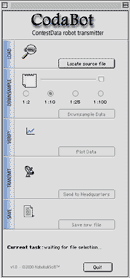 | |
| Next Chapters >>> | ||
