Installation of the required Contest files
Before installing
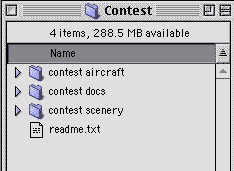 The Contest package
After downloading the contest package, you need to decompress the Zip archive. You need Winzip, Stuffit Expander or something similar to unstuff the archive.
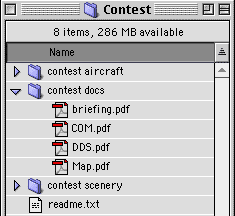
The extracted folder looks like the pic on the left.
You get the official contest glider aircraft, the contest documentation and the scenery files.
 2. The documentation
You find in the "contest docs" folder four MUST READ documents.
The COM is the Contest operating manual and describes generic rules.
The DDS is the Detail data sheet, for the current contest and contains detailed settings and flight data.
The Briefing doc contains, well, the briefing, of course.
And the Map is your guide to the scenery.
 3.The Glider
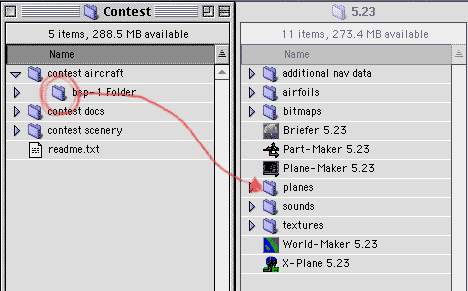
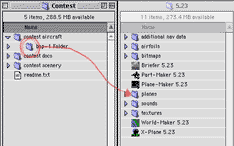
You simply drag'n'drop the BSP-1 glider folder to your "Planes" folder in the active X-Plane system folder.
Keep all the files in the same folder, and do not modify the acf file.
 4.Scenery files I
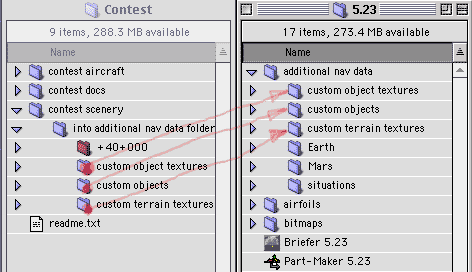
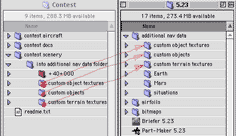
Open the "Custom objects" folder and drag all items to the "Custom objects" folder inside your active XP "Additional nav data folder".
Do the same for the custom objects textures and the custom terrain textures. This installs all required objects and textures, except the env file itself (see 5.)
 5. Scenery files II
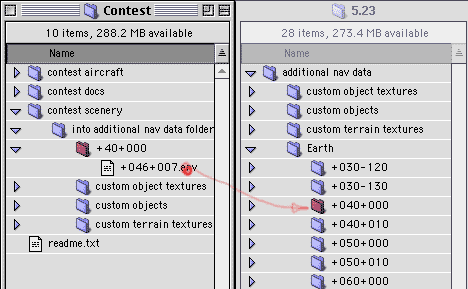
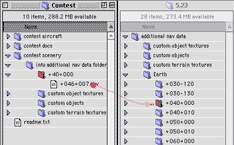
Last step is to move the +046+008 env file in the +040+000 folder inside the "additional nav data / Earth" folder.
If the +040+000 folder does not exists, simply create it, and put the +046+008 as the only file into it.
NOTE: If you already have installed an old Swiss scenery package, you will need the new ESP v3 textures. The scenery file is in ESP v3 standard, sou you can use any ESP v3 texture set to view the file properly.
For the best enjoyment, download the whole swiss scenery package and install BEFORE you install the contest files, then overwrite the swiss scenery files with those that came with the contest package.
rev. 2.0 (20011-LSMU) / ©2001, dESPair