Chapter C
Standard Mission format
All downloadable dESPair missions should be in the same format, filetype and hierarchy wise.
The standard mission folder's hierarchy looks like this:
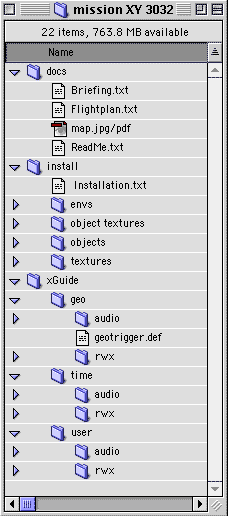
First comes the "docs" folder, featuring all the nescessary documentation for the mission.
In the install folder, there is everything that must be installed for this mission. And the installation instruction
The xGuide folder contains everything that is required to use Hektor/EarCandy.
The geo folder contains all files for the geoTrigger feature, the time folder contains all files that are timer triggered, and the user folder contains all files that get activated through keyboard input (user trigger).
All text files shall be provided as plain text files, HTML pages or in Acrobat PDF format.
All sound files need to be in windows WAV (wave) file format. (This might change, once QT for windows is implemented in EarCandy)
For your convenience, we have prepared a couple of mission folder templates, ready for download and use for your missions. Use them as starting points to keep the file/folder hierarchy consistent (and thus, allow for possible automation of the installation process).
Leave empty folders where they are. They do not contribute to the downloadsize.
Read more about the file formats (rwx, geotrigger etc.) in the Hektor / EarCandy tutorial pages, and soon in the Hektorizer manual pages.
<<< | >>>







