|
dESPair
PATHy 1.0 - Tutorial
Working with Maps
PATHy can use any 500*500 pixel picture that represents 1* 1 degree of any area of the world as an underlying map in the MFD.
You can scan and resize road maps, maps from online map sites, or you can use MapShooter 1.0, which comes with your PATHy download package.
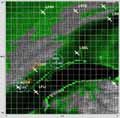
MapShooter can (batch) process any env file - the scenery files that are freely available for X-Plane. MapShooter loads the env grid data, draws the polygon map and shades the map altitude related.
With only a few mouse clicks, you can produce tons of pretty useful maps to be used in PATHy.
The maps need to be named exactly like the env files, in the format:
+-Lat-+Lon.pct (e.g. +046+007.pct, +032-121.pct etc.)
MapShooter names the map correctly, so you don’t need to bother about that.
To load one of those 1*1° map pictures into the MFD display, hit the “Load Map” button in the MFD window. Select the proper file and notice that PATHy not only draws the map, but also displays the proper airports and navaids.
Scrolling is not yet usefully implemented (sorry, this is tricky stuff). But you can simply reload the adjacent map to “scroll” in 1 degree steps.
You can think of those labeled pictures as “bookmarks” for a certain area. If you want to fly around Bern, Startup PATHy and load the +0046+007 picture map - PATHy will automatically load and display the proper airports and navaids.
If you have QuickTime (Quicktime for windows) installed, you should be able to load maps from almost any important picture format. On the Mac, you can use any Quicktime formats, like Pict, JPG, GIF, windows Bitmap, tiff, png, pdf and many more. I suggest you work with JPGs, as they allow for good compression with controllable quality.
If you don’t use MapShooter, you can scan and resize any map you want. Just make sure that
a) the lower left corner of the map is at the coordinates stated in the file’s name
b) the map is 500*500 pixel big and covers exactly 1 by 1 degree
| |
INDEX Back To HabakukSoft
1) What is PATHy
2.) Requirements
3.) Registration
4.) Tutorial
- Installation
- Navigation / Controls
- Exploring the windows
- Centering the map
- Measuring distances
/headings
- Planning a flight
- Using airports
- Using VORs and NDBs
- Adding legs
- Printing the MFD
- Printing the flight plan
- Saving the flight plan
- Working with maps
- Planning VFR flights
5.) Download / Updates
6.) Support
|







