|
dESPair
PATHy 1.0 - Tutorial
Measuring distances / headings
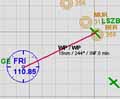
If you only want to know a few headings and distances, you probably don’t want to go through the whole planning process. Then, you simply
- center the map on the airport of your choice
- click on the first leg point and hold the mouse
- drag the mouse pointer to the leg end point and
- release the mouse button
Now PATHy draws the line, calculates heading and distance, and - if you have supplied an airspeed for the leg - the estimated leg time.
Scrolling or zooming the map will delete the line.
This is an easy way to get some basic informations from the airport and nav data set.
| |
INDEX Back To HabakukSoft
1) What is PATHy
2.) Requirements
3.) Registration
4.) Tutorial
- Installation
- Navigation / Controls
- Exploring the windows
- Centering the map
- Measuring distances
/headings
- Planning a flight
- Using airports
- Using VORs and NDBs
- Adding legs
- Printing the MFD
- Printing the flight plan
- Saving the flight plan
- Working with maps
- Planning VFR flights
5.) Download / Updates
6.) Support
|







