 |  |  | |  |  |  | |  | |
 | |||||||||
 | | |
| dESPair PATHy 1.0 - Tutorial
| INDEX Back To HabakukSoft | |
checked, then each leg you draw is instantly converted into a flight leg with the proper coordinates, heading etc. So, you point to the start location, click and hold the button, move the pointer to the end location on the map, and release the button. The leg will be drawn and the data added to the FlightPlan window listbox. |  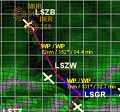 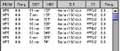 | |
| VFR flight planning on top of the map You can now use both techniques to define legs: the jump method (from ap/nav to ap/nav) or the “Draw Legs” method (waypoint1 to waypoint 2). The map & DrawLegs feature make it easy to describe a pretty accurate flight path through the scenery. Load a map, and draw the plan while looking at the env topo below. It can’t get easier. In the PATHy 1.0 release, the drawn legs are not matched to any nearby navaids or airports. So, drawing legs does not give you any information about the nearby navaid frequencies. |
